
Sparrow Bitcoin Wallet
Sparrow is a Bitcoin wallet for those who value financial self sovereignty. Sparrow's emphasis is on security, privacy and usability. Sparrow does not hide information from you - on the contrary it attempts to provide as much detail as possible about your transactions and UTXOs, but in a way that is manageable and usable.

Sparrow supports all the features you would expect from a modern Bitcoin wallet:
- Full support for single sig and multisig wallets on common script types
- A range of connection options: Public servers, Bitcoin Core and private Electrum servers
- Standards based including full PSBT support
- Support for all common hardware wallets in USB and airgapped modes
- Full coin and fee control with comprehensive coin selection
- Labeling of all transactions, inputs and outputs
- Lightweight and multi platform
- Send and receive to PayNyms, both directly (BIP47) and collaboratively
- Built in Tor
- Testnet, regtest and signet support
However, Sparrow is also unique in that it contains a fully featured transaction editor that also functions as a blockchain explorer. This feature not only allows editing of all of a transaction's fields, also easy inspection of the transaction bytes before broadcasting. Sparrow contains many more features that are covered in detail on the features page.
Sparrow is also strongly supportive of privacy, and aims to be a wallet that takes users on a privacy journey from using public servers to using cold storage techniques on private servers. For more details, read the Best Practices guide.
Despite being a wallet suitable for advanced users, Sparrow is not difficult to use. Download it, install and follow the Quick Start guide - you'll be flying soon!
Features

Like a browser, but not!
Not Browser Based
Sparrow is a tab based desktop wallet, but it doesn't use browser technology. Browsers are inherently less safe than dedicated desktop applications because their wide capabilities mean they have a large attack surface. Like a hardware wallet is deliberately a simple device to reduce the number of possible attacks, a browser sits on the other end of that spectrum.

Many, many standards here
...but Standards Based
Sparrow tries wherever possible to adhere to commonly accepted standards in order to have as wide an interoperability as possible. In particular, it has been built to support Partially Signed Bitcoin Transactions (PSBTs) from the ground up, influencing everything from the keystore design to the transaction editor.

All wallet types welcome
All HD Wallet Types Welcome
Sparrow not only supports single sig and multisig with all legacy and Segwit script types, but gives you full control in the wallet creation process - and then lets you edit the wallet later if you choose! In addition to BIP39 mnemonic seeds and watch-only xpub keystores, all common hardware wallets are supported and can be easily imported using USB or their own file formats. Run Sparrow in testnet or signet, or configure your wallet using an output descriptor. In addition, Sparrow supports importing and exporting Electrum wallets - even encrypted ones!
Strong Encryption
Many wallets use relatively weak password hashing in order to support a wide range of devices, such as PBKDF2 or similar. Sparrow is desktop focussed and uses a configuration of Argon2 (winner of the Password Hashing Competition in 2015) configured to take at least 500ms on modern hardware to derive the key from your password in order to unlock your wallet. Even if it only contains public keys, that data is still worth protecting properly.

See all the inputs, all the outputs
Detailed Wallet History
With Sparrow, you can drill down into your transactions to easily understand the inputs, outputs and addresses involved. All of these can be labelled, and Sparrow automatically applies your label appropriately to all of them when sending. Instead of trying to fit an account model, Sparrow embraces Bitcoin's UTXO model. Want to know which inputs and outputs were sent or received from an address? Want to understand when a particular UTXO was spent? Sparrow makes this easy.

Know the flow before you go
Control and Understand your Sends
Starting with coin control and ending with a detailed byte level transaction viewer, Sparrow gives full transparency and control throughout the transaction creation and signing process. Uniquely, Sparrow provides an editable diagram showing your inputs and outputs as you create a transaction to make it easy to optimise UTXO usage and reduce fees. Current fee estimates are charted to select an appropriate block target. UTXO selection is done via Branch and Bound and Knapsack coin selectors, like Bitcoin Core. Once input and outputs are decided, you can edit all transaction metadata in the comprehensive transaction editor (which naturally supports PSBTs as well).

Simple signing progress indicators
All Sign Here
Transaction signatures are collected in the PSBT directly in the transaction editor. Sparrow software wallets, normally encrypted, have their private keys unlocked only for the duration of the signing (in temporary local variable storage). USB and airgapped hardware wallet signing is supported, along with QR fountain codes implementing the UR standard that allows for any PSBT data length to be transmitted. At any stage, all of the fields of the transaction can be inspected, including the signing script along with the signatures and pubkeys. The PSBT and final transaction can be saved for external use as necessary (or simply copied from the hexadecimal view!).
Lightweight
Sparrow is a lightweight wallet, and instead of relying on SPV technology (which has privacy implications) it leverages the power of your Bitcoin node, either directly or via an Electrum server. An Electrum server maintains a full index of all Bitcoin transactions to provide Sparrow with instant startup and immediate transaction history. Fulcrum, ElectrumX, Electrs, Electrs-Esplora, EPS and BWT are all supported over SSL and built in Tor. Alternatively, you can connect directly to your Bitcoin Core node. Sparrow also provides a list of preconfigured public servers for those starting out on their privacy journey.
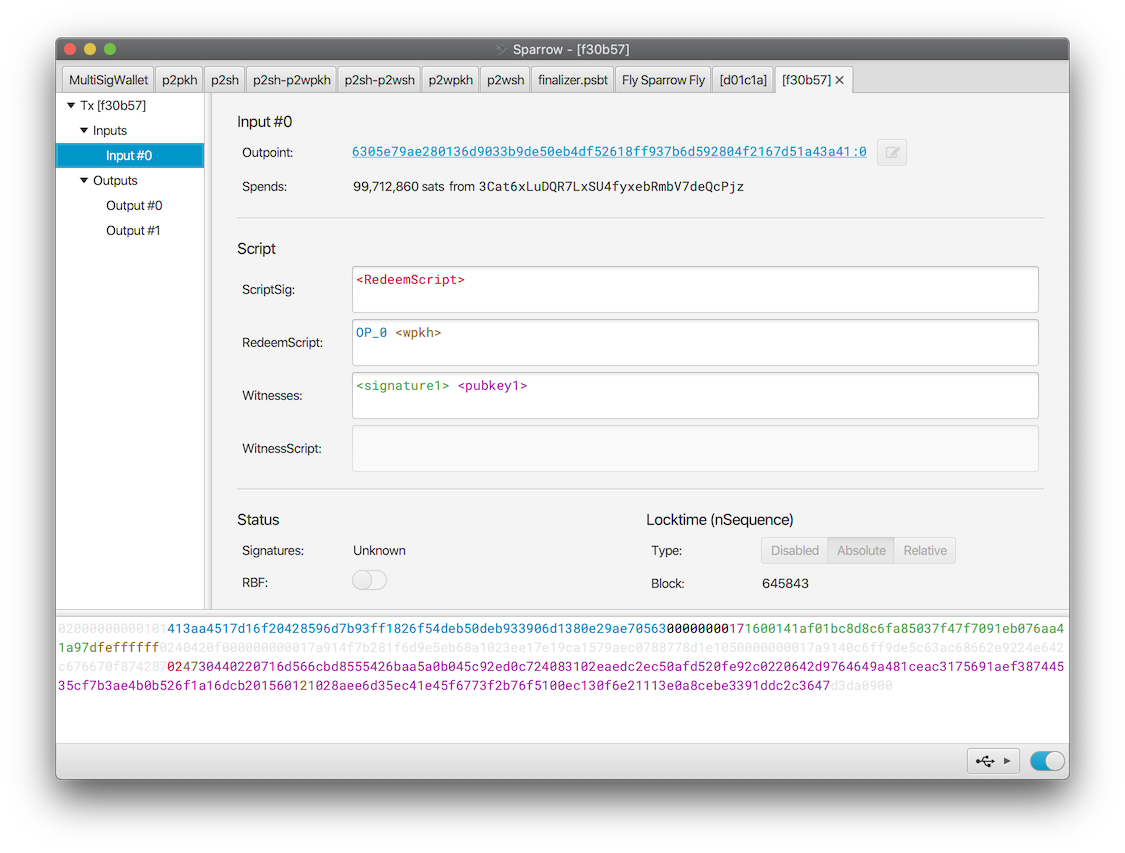
A private journey through the transaction graph
Your Own Blockchain Explorer
With all this power, the transaction viewer doubles as a private blockchain explorer. All inputs and spent outputs are linked so you can explore the transaction graph and understand the full transaction history, as far back as the coinbase transaction. In addition, any transaction can be loaded via it's transaction ID or hexadecimal/base64 representation (in text or QR) for detailed inspection.
Download
Latest release: 2.5.2 Previous releases and changelog
Sparrow Desktop
Sparrow Desktop is the fully featured desktop application. For headless systems, use Sparrow Server below.
| Type | Link |
|---|---|
| macOS (Apple M-series) | Sparrow-2.5.2-aarch64.dmg |
| macOS (Intel) (11+) | Sparrow-2.5.2-x86_64.dmg |
| Windows Installer (10+) | Sparrow-2.5.2.msi |
| Windows Standalone (10+) | Sparrow-2.5.2.zip |
| Linux (Intel/AMD) (Ubuntu/Debian) | sparrowwallet_2.5.2-1_amd64.deb |
| Linux (Intel/AMD) (Redhat/CentOS) | sparrowwallet-2.5.2-1.x86_64.rpm |
| Linux (Intel/AMD) Standalone | sparrowwallet-2.5.2-x86_64.tar.gz |
| Linux (ARM64) (Ubuntu/Debian) | sparrowwallet_2.5.2-1_arm64.deb |
| Linux (ARM64) (Redhat/CentOS) | sparrowwallet-2.5.2-1.aarch64.rpm |
| Linux (ARM64) Standalone | sparrowwallet-2.5.2-aarch64.tar.gz |
| Manifest Signature | sparrow-2.5.2-manifest.txt.asc |
| Manifest | sparrow-2.5.2-manifest.txt |
Sparrow Server
Sparrow Server builds are intended for systems without displays (headless platforms). Note the .deb and .rpm packages install to /opt/sparrowserver.
| Type | Link |
|---|---|
| Linux (Intel/AMD) (Ubuntu/Debian) | sparrowserver_2.5.2-1_amd64.deb |
| Linux (Intel/AMD) (Redhat/CentOS) | sparrowserver-2.5.2-1.x86_64.rpm |
| Linux (Intel/AMD) Standalone | sparrowserver-2.5.2-x86_64.tar.gz |
| Linux (ARM64) (Ubuntu/Debian) | sparrowserver_2.5.2-1_arm64.deb |
| Linux (ARM64) (Redhat/CentOS) | sparrowserver-2.5.2-1.aarch64.rpm |
| Linux (ARM64) Standalone | sparrowserver-2.5.2-aarch64.tar.gz |
| Manifest Signature | sparrow-2.5.2-manifest.txt.asc |
| Manifest | sparrow-2.5.2-manifest.txt |
Older Operating Systems
Users of macOS 10.13 to 10.15, as well as older Linux systems can try the latest release from the 1.x series.
Verifying the Release
For all Bitcoin software, it's a particularly important security step to verify the release. This is done to ensure the installation file you download has not been compromised.
Sparrow 1.8.3 or later
If you have Sparrow 1.8.3 or later installed, this is simple to do using Sparrow itself. Just download the following 3 files to the same folder (for example, your Downloads folder):
- Manifest Signature: sparrow-2.5.2-manifest.txt.asc
- Manifest: sparrow-2.5.2-manifest.txt
- Your install file from the list above
Drag and drop any of these files onto Sparrow, and the Verify Download dialog will open and verify your download. You can also open the Verify Download dialog from the Tools menu.
| Signed By: | Craig Raw <craig@sparrowwallet.com> on Sun 31 May 13:43:59 2026 SAST |
| Release Hash: | Matched manifest hash |
| Verified: | Ready to install Sparrow-2.5.2-aarch64.dmg |
You can also use this tool to verify other software, like Bitcoin Core or the firmware for a hardware wallet.
Earlier releases
With earlier versions of Sparrow, you'll need to have gpg or gpg2 installed on your system (see here for macOS or Windows, on Linux it's preinstalled). Once you've installed gpg, you'll need to use the command line. You can do this by opening Terminal.app in macOS, or Start > Run > cmd in Windows.
First, import the keys that have signed this release (if you haven't done so already, or if a previously imported key has expired):
curl https://keybase.io/craigraw/pgp_keys.asc | gpg --import
Once you have the required PGP keys, you can verify the release. Download sparrow-2.5.2-manifest.txt and sparrow-2.5.2-manifest.txt.asc from the table above to the same directory (for example, your Downloads directory). Then verify the manifest file with:
cd Downloads
gpg --verify sparrow-2.5.2-manifest.txt.asc
You should see the following if the verification was successful (your timezone may differ):
gpg: assuming signed data in 'sparrow-2.5.2-manifest.txt'
gpg: Signature made Sun 31 May 13:43:59 2026 SAST
gpg:                using RSA key D4D0D3202FC06849A257B38DE94618334C674B40
gpg: Good signature from "Craig Raw <craig@sparrowwallet.com>" [unknown]
Note that you may get a message similar to the following:
gpg: WARNING: This key is not certified with a trusted signature!
gpg:          There is no indication that the signature belongs to the owner.
This simply means that you have not explicitly marked the public key as trusted in your own instance of GPG. In this case it is good practice to check the key against other sources, for example https://keybase.io/craigraw (click on the link next to the key icon to see the full public key). You can read more about validating keys in the GnuPG Privacy Handbook.
You have now verified the signature of the manifest file, which ensures integrity and authenticity of the manifest file - not the binaries! Next, depending on your operating system, you must re-compute the sha256 hash of the archive with shasum -a 256 <filename>. First, download the installation for your operating system (if you haven't done so already). Then follow the steps below to compare it with the corresponding one in the manifest file, and ensure they match exactly. For example:
macOS
shasum --check sparrow-2.5.2-manifest.txt --ignore-missing
Sparrow-2.5.2.dmg: OK
Note: Older versions of macOS (pre v11) don't support --ignore-missing. You can leave it out and ignore the missing files reported.
Linux
sha256sum --check sparrow-2.5.2-manifest.txt --ignore-missing
sparrowwallet_2.5.2-1_amd64.deb: OK
Windows
CertUtil -hashfile Sparrow-2.5.2.msi SHA256 | findstr /v "hash"
Compare result to the appropriate value in sparrow-2.5.2-manifest.txt!
With all these steps complete you can be certain of the integrity of your download and can proceed to install!
If you are still struggling, watch this tutorial which covers the same process on macOS. There are also written tutorials for Windows and Ubuntu.
Installation
Sparrow should be installed as normal for your operating system.
Note that on QubesOS, you will need to run the following command first:
sudo mkdir /usr/share/desktop-directories/
Upgrading
Sparrow stores all wallets and settings separately from the installation in the Sparrow home folder. It is safe to uninstall Sparrow, or to upgrade the installation without risking your data. Make sure to close the application first.